

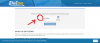
1. Wait a couple seconds for the cloudflare box to load, when it does click in the box to verify your human, then click the encircled button bellow it in the image to continue

________________________________________________________________________________________________________________________________________________________________
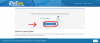
2. Wait until it loads to a 100 then click on the button encircled in red

________________________________________________________________________________________________________________________________________________________________
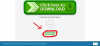
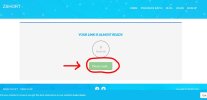
3. Wait ten seconds as your link loads then click on the red encircled button to finish and download your novel

________________________________________________________________________________________________________________________________________________________________
4. (Manga only) select and copy the password text encircled in red, then follow all the download steps for novels shown already

________________________________________________________________________________________________________________________________________________________________
5. (Manga only) Paste the password you copied and press continue

6. (Manga Only) click the red encircled button to start you manga download

9. If You encounter a problem when trying to download, and your re-directed to page that looks like the 2 images bellow, switch to chrome browser if your not already using it, if that doesn't fix, install a VPN or Proxy from your browser add-ons and unblock the page


________________________________________________________________________________________________________________________________________________________________
10. If you have a issue like the image bellow, make sure your antivirus is temporarily turned off, or make a exception on your antivirus for the blocked site

_____________________________________________________________________________________________________________________________________________________
11. Some extra troubleshoots for those who still can't download:
A. Make sure your adblocker is off, that will cause problems when downloading
B. Ignore Popups & redirects, just close whatever popups & redirects appear and finish the stated download steps
C. Use a Vpn/Proxy to unblock whatever book link that doesn't work
D. Use google chrome with incognito tab
E. If you left the download process midway for a couple minutes you will be redirected to kecapcu main page when you attempt to continue, you have to close the page and start over from the download link
________________________________________________________________________________________________________________________________________________________________
For those of you who enjoyed their experience here and want to help out you can donate some money, Your donation will only be used in purchasing new books for this site, for more information on how to donate click on this link: https://mp4directs.com/donate/
(Ps: if you liked a book or series on this website remember to thank the person who posted it, do this in the comment section of that series page, Feedback is important it helps keep this site alive and lets the person know they're appreciated)
Join Our DISCORD SERVER
________________________________________________________________________________________________________________________________________________________________
2. Wait until it loads to a 100 then click on the button encircled in red
________________________________________________________________________________________________________________________________________________________________
3. Wait ten seconds as your link loads then click on the red encircled button to finish and download your novel
________________________________________________________________________________________________________________________________________________________________
4. (Manga only) select and copy the password text encircled in red, then follow all the download steps for novels shown already
________________________________________________________________________________________________________________________________________________________________
5. (Manga only) Paste the password you copied and press continue
6. (Manga Only) click the red encircled button to start you manga download
9. If You encounter a problem when trying to download, and your re-directed to page that looks like the 2 images bellow, switch to chrome browser if your not already using it, if that doesn't fix, install a VPN or Proxy from your browser add-ons and unblock the page
________________________________________________________________________________________________________________________________________________________________
10. If you have a issue like the image bellow, make sure your antivirus is temporarily turned off, or make a exception on your antivirus for the blocked site
_____________________________________________________________________________________________________________________________________________________
11. Some extra troubleshoots for those who still can't download:
A. Make sure your adblocker is off, that will cause problems when downloading
B. Ignore Popups & redirects, just close whatever popups & redirects appear and finish the stated download steps
C. Use a Vpn/Proxy to unblock whatever book link that doesn't work
D. Use google chrome with incognito tab
E. If you left the download process midway for a couple minutes you will be redirected to kecapcu main page when you attempt to continue, you have to close the page and start over from the download link
________________________________________________________________________________________________________________________________________________________________
For those of you who enjoyed their experience here and want to help out you can donate some money, Your donation will only be used in purchasing new books for this site, for more information on how to donate click on this link: https://mp4directs.com/donate/
(Ps: if you liked a book or series on this website remember to thank the person who posted it, do this in the comment section of that series page, Feedback is important it helps keep this site alive and lets the person know they're appreciated)
Join Our DISCORD SERVER
Attachments


Last edited:


